

Finding a Test Level in Volts to Achieve a Desired SPL
Introduction
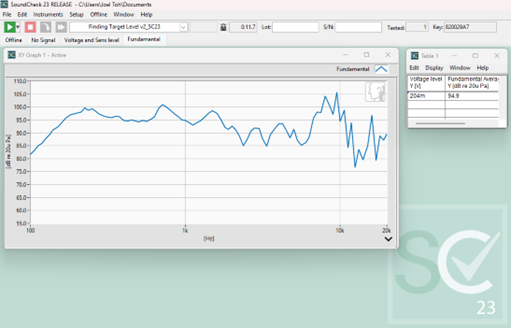
The purpose of this sequence is to find the test level (volts) to achieve a desired sound pressure level (dB SPL). The user enters the desired sound pressure level. 1 volt is played through the amplifier which is used to then calculate the appropriate voltage level to obtain the desired Sound pressure level. The sequence then runs a stepped sine sweep using the calculated voltage level and outputs the frequency response.
Software Requirements
SoundCheck 23 or higher
Hardware Requirements
- Audio Interface – Listen AudioConnect 2 or similar
- Power Amp – Listen SCAmp or similar
- Reference Microphone – Listen SCM-4 or similar
Hardware Setup
- Calibrate the amplifier as instructed in the SoundCheck manual.
- Calibrate the reference microphone as instructed in the SoundCheck manual.
- Connect output 1 of the audio interface to the input of the amplifier.
- Connect the amplifier output to the loudspeaker.
- Position the reference microphone at the desired test distance from the loudspeaker and connect it to the microphone power supply.
- Connect the output of the mic supply to input 1 of your audio interface.
You are ready to start the sequence.
System Diagram

Further sequence development
Ways in which you could modify or further develop the sequence include:
- Doubling the tests for a stereo speaker system
- Add autosave steps to store your data and results
- Add/Modify analysis for additional distortion measurements
Download Finding Target Level Sequence (zip file)
Download Finding Target Level Sequence documentation (PDF)


