

Introduction
This test suite contains sequences to measure a vehicle infotainment system to the methods outlined in the
Audio Engineering Society (AES) Technical Committee on Automotive Audio (TC-AA) in-vehicle measurements
white paper. This white paper aims to define repeatable and defined car audio system measurements and in
addition to the measurement methods, contains information on standardized test configuration, for example
microphone and seat positioning. Please contact the TC-AA for more information on this project. This test
sequence may, of course, be used with your own in-house physical configuration if adherence to the TC-AA
guidelines is not essential.
Bluetooth and Open Loop
There are two methods of connecting to the vehicle that are supported with these sequences: Bluetooth and
Open Loop.
Bluetooth sequences should be used with a direct Bluetooth connection from a Bluetooth interface to the head
unit where the signals can be sent from SoundCheck software. The Echo ATS-BT is recommended for future use.
The BTC and BQC are deprecated and are included for legacy purposes.
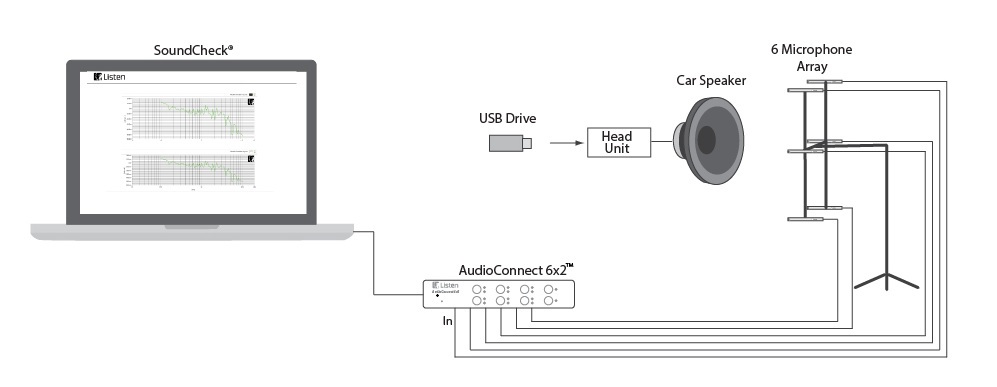
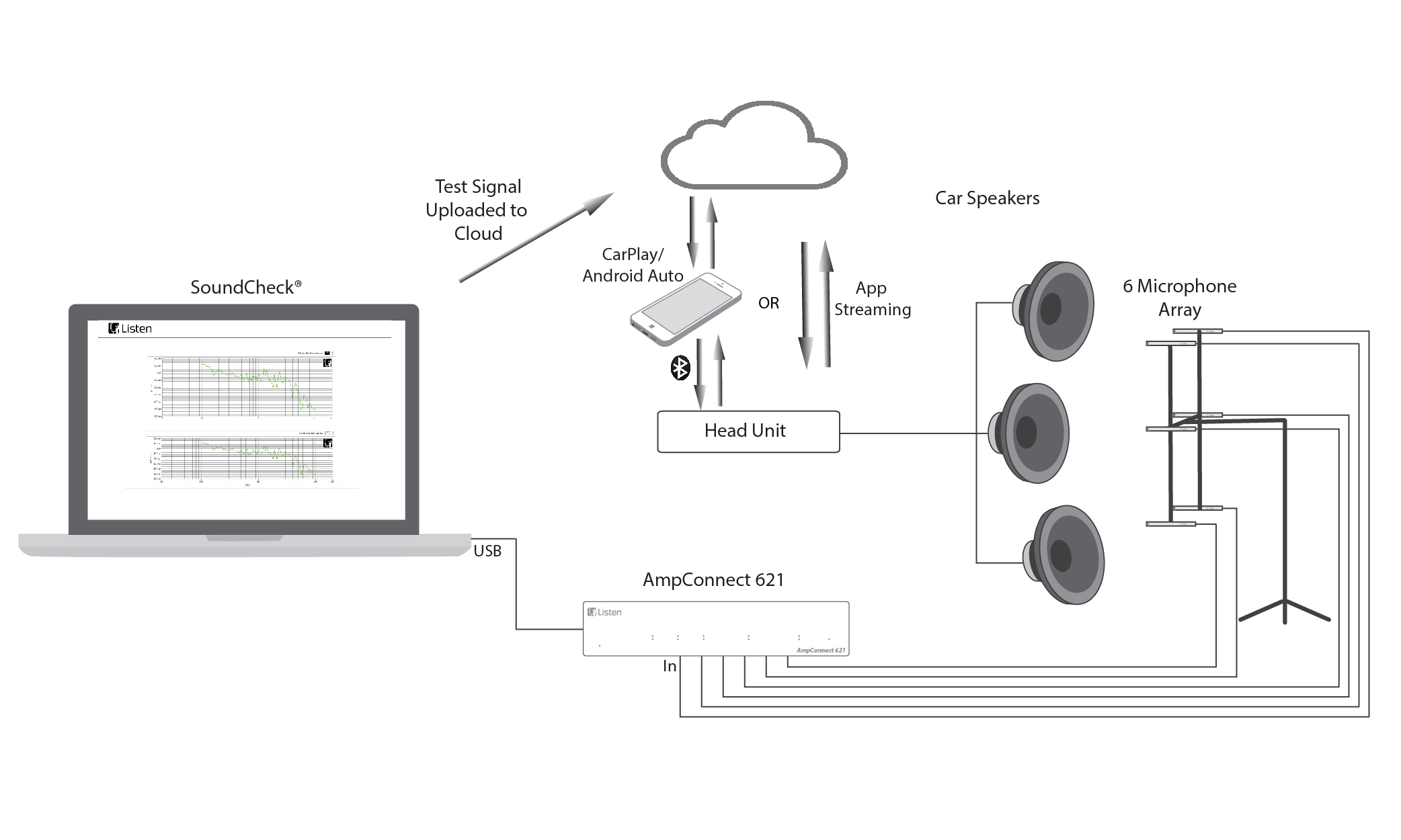
Open Loop can be used when a direct connection with the SoundCheck software is not possible. Wave file test
signals are included in the “Open Loop WAV Files” directory. These files can be loaded onto a USB stick and
played directly, onto a phone and played via CarPlay, or any similar method.
To simplify the sequences, there are three folders containing the three options. Whichever connection method
used will yield the same results.
If using Bluetooth, Sequence 1 – “Bluetooth Pairing to Head Unit” must be run first to connect to the
infotainment system of the vehicle. If using Open Loop, load both Wave files from “Open Loop WAV Files” onto
your playback device and you will be prompted during sequence run to play the appropriate signal.
Software Requirements
- SoundCheck Plus Version 24.02 or higher part #1102
- Optional Modules:
• 2005 – RTA Analyzer
• 2024 – 8 Channel Acquisition
• 2042 – Python Custom Step for control of Bluetooth devices
Hardware Requirements
- Interface with 6 inputs
– Listen AudioConnect 6×2 Part #4049
– AmpConnect 621 Part #4046
Note: An audio interface with S/PDIF is required for use with the Echo ATS-BT - Bluetooth interface
– Echo ATS-BT Part #5850
– Portland Tool & Die BTC/BQC Part #5816 (Legacy) - 6 SCM Microphones or similar. Part #4012
- 6 Microphone Array*, Part #4016
*Please reference the Microphone Array and Position section of the standard for specific requirements
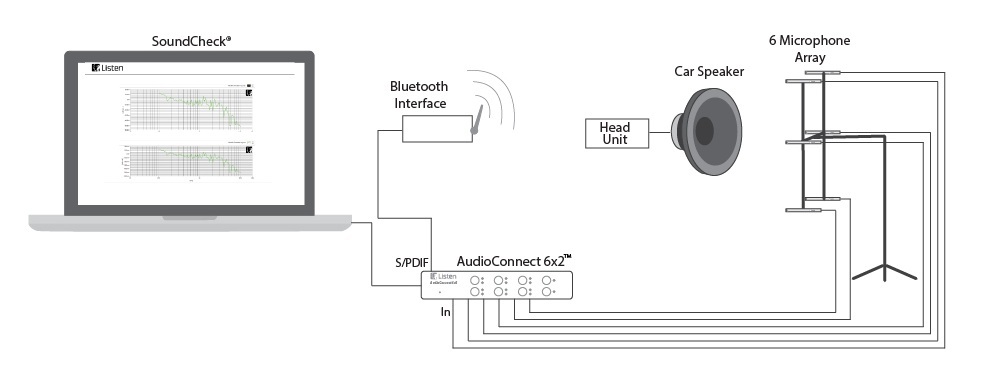
System Diagram
Software Configuration
At the end of the measurement sequence there is a prompt to save data in the default data folder. This can be
adjusted in “Edit > Preferences > Folder Paths > Default Data Path” on a per device basis to make sure all
captured data for each unit under test is saved to the same directory.
Your SoundCheck Calibration may not include the Signal Paths used in these sequences. Before opening the
sequence for the first time, please take the following steps to import the Signal Paths and associated calibrated
device files.
- Go to Setup > Calibration and press the Import button
- Browse to the Calibration folder included in the sequence distribution folder, select either the “Open Loop.cal” file, the “BQC BTC Bluetooth.cal” file, or the “Echo ATS-BT.cal” and click OK
- When prompted to import calibrated device files, select Yes
- When prompted to overwrite existing calibrated device files, select No
Hardware Setup & Calibration
- Connect the microphones to input 1-6 of your audio interface
- Calibrate the microphones as instructed in the SoundCheck manual
- Place the six microphones in the vehicle, adhering to the microphone array and positioning appendix
section in the white paper. - All accessible audio system settings should be set to default or factory reset to neutral or flat. These
settings should be documented. - Depending on your connection method:
a. BQC BTC Bluetooth – Connect your Bluetooth device and run the sequence “Bluetooth Pairing to
Head Unit”. This sequence is written for a PT&D BQC. If using a BTC, message steps labelled
“BQC” will need to be changed to BTC.
b. Echo ATS-BT – Connect your audio interface S/PDIF output to the Echo ATS-BT IN. In
SoundCheck’s hardware, make sure Digital Out 1 & 2 signal paths are assigned to the S/PDIF
hardware channels.
c. Open Loop – The audio files included in “Open Loop WAV Files” must be copied and able to be
played through the infotainment system. For example, placed on a USB device or loaded on to a
phone to be used via CarPlay.
You are ready to start the sequences.
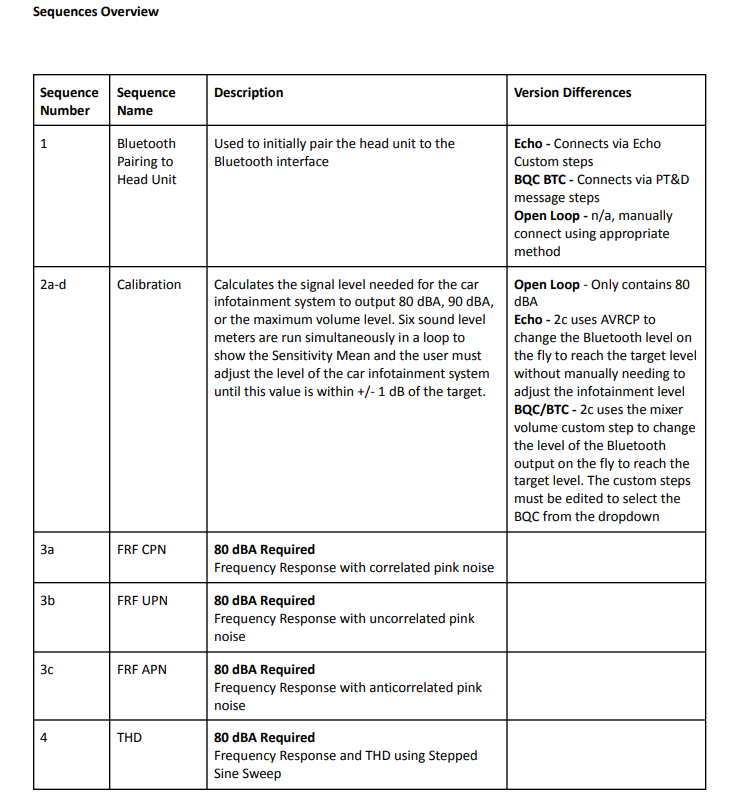
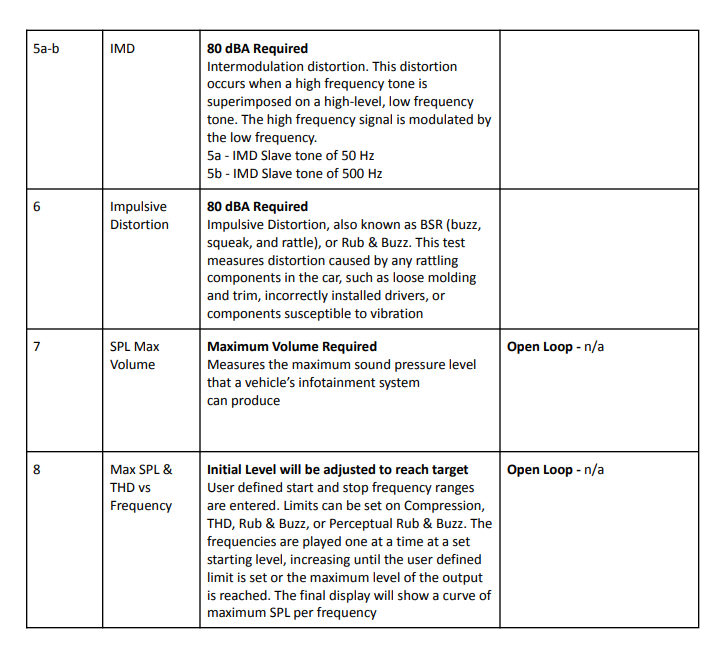
Calibration Sequences
There are two different level calibration sequences. These are used to adjust the infotainment system to either
80 dBA or maximum level. The appropriate level will be specified in each of the following test sequences.
A target level calibration sequence is also available (2c) that can be used to test at different levels if adherence to
the TC-AA guidelines is not essential.
Further Sequence Development
Ways in which you could modify or further develop the sequence include:
- Autosave steps can be hard coded to no longer prompt the user for a default data path
- AVRCP steps can be added within sequences to automatically play at different levels
- User defined limits can be set for your particular vehicle targets


